SHARE
Calculating Sales Taxes with Stripe and TaxJar

Here at Accelfa, we’ve helped many organizations develop or improve their SaaS applications, marketplaces, or e-commerce websites. When it comes to these products, there is only one certainty, much like in everyone’s life: taxes. Another certainty is that with taxes comes complexity. Helping our customers navigate and mitigate tax complexities is a small part of what we do, but a vital one. For that reason, we wanted to help you with the integration of various sales tax collection options we’ve used in our various projects, as well as to help you decide between them for your particular use case.
Complex and Tedious
Collecting taxes is a very tedious task no matter where you are, especially in the United States. A great number of details must be considered to determine the correct tax amount to charge, and it can be an overwhelming and frustrating process to figure it out on your own. Worse still, these details change constantly, and it is imperative that these changes are tracked and considered at any given time.
One key factor is jurisdiction. A jurisdiction is the taxation authority that imposes the tax. We can consider tax jurisdictions municipalities, states, counties or countries, each with its distinct regulations for taxation and each one identified by a tax jurisdiction code. According to software companies Avalara and TaxJar, there are more than 13,000 tax jurisdictions in the United States alone.
Jurisdictions are arranged in a hierarchy. For example, a city belongs to a state and a state to a country. The amount of the total tax rate to be collected is the sum of the combined tax rates from each jurisdiction in the hierarchy. For example, if your city has a sales tax rate of 1%, and the state it resides in has a tax rate of 2%, then the total tax rate would be 3%.
For a real-world example, consider New York: For most personal property, (furniture, electronics, alcohol, etc.) New York City applies a sales tax of 4.5%, and NY State Sales and Use tax is 4%. There is also a Metropolitan Commuter Transportation District surcharge of 0.375%. This combines with a total Sales and Use Tax of 8.875%.
Sourcing
This jurisdictional complexity could be just the tip of the iceberg because not all states in the US calculate taxes in the same way. In the US, there are two different types of states (in terms of taxation):
- Origin-sourced sales tax states: If the seller is based in an origin-based state, they charge the amount of state and local sales tax effective at their business’ location to everyone to who you ship taxable items in that state. In other words, if you are based in Phoenix, Arizona, and sell to someone in Tucson, AZ, the sales tax will be calculated based on the applicable taxes in Phoenix, Arizona. However, there is some variance even within origin-based states. For instance, if you are based in California, any city, county, or state taxes will be based on the origin of the seller, while district sales tax is based on the customer’s location.
- Destination-sourced sales tax states: If the seller is based in a destination-based state, they must calculate the sales tax rate effective where their buyer is located. This means the combination of local sales taxes can be bigger which makes this category a bit trickier.
When you add in interstate sales, there can be another layer of complexity, because sourcing rules work differently as a remote seller. There, it depends on if you are selling to another state where you have nexus. Essentially, nexus means your business footprint in the destination state meets a minimum threshold to be charged state sales tax. The threshold varies, it might be based on the number of transactions (i.e. 200 transactions), or a certain amount of sales (i.e. $100,000).
If you do not meet nexus threshold requirements, you do not need to collect sales tax for sales to those locations.
Product Categories
If you delight in complexity, and jurisdictional concerns are not enough, you’ll be happy to know that there’s still more to consider, because the product category is also important. Selling flowers is not the same as selling shoes. Different markets, and different processes for sourcing, distribution, and selling exist for nearly every product category. Depending on the category, the sales tax rate will also vary. For example, for beauty, barbering, hair restoration, manicures, pedicures, electrolysis, massage, tanning, tattooing, and other similar services, the NY City Sales Tax rate is 4.5% on the service. But for parking, garaging, or storing motor vehicles, the NY City charges a 10.375% tax and an additional 8% surtax in Manhattan
Now that you understand the layers of complexity governing sales tax collection and calculation, you can understand why additional tools to handle sales tax collection might be necessary. In the following sections, we’ll be looking at some of the options available to make this task more manageable, as well as how to set them up.
Stripe
Stripe, Inc. is an Irish-American financial service and software-as-a-service company with dual headquarters in San Francisco, USA, and Dublin, Ireland.
Stripe has a tool called Stripe Tax that automates the process of calculating the sales tax, VAT, and GST on Stripe transactions. In order to use it, users need to configure their tax settings within the Dashboard and, depending on their integration (no-code integration such as a payment link or low-code integration such as a Checkout session), add one line of code.
Set up:
- Confirm the origin address: Where the business is located or if the user sells physical goods, the address where they’re shipping goods from.
- Select a default tax category: Stripe uses this to apply the correct tax rate in the case where a product does not explicitly have a tax code. You’ll notice this will be required in every platform and each one has its own format.
- Add tax registrations: You have to register with the local tax authority before you can add the tax to your transactions.
- Add Stripe Tax to your integration to start collecting taxes: Stripe provides different integrations to facilitate making transactions (e.g. Invoicing, Billing, Checkout). In the picture below, we can see an example of a Checkout session which is a low-code integration. In this case, users would need to add automatic_tax[enabled]=true and the tax rates will be calculated automatically.
Note: The products need to be previously created in the dashboard and one of the attributes for these records is the tax code.
Here you can also see a complete overview of the benefits of Stripe over PayPal.
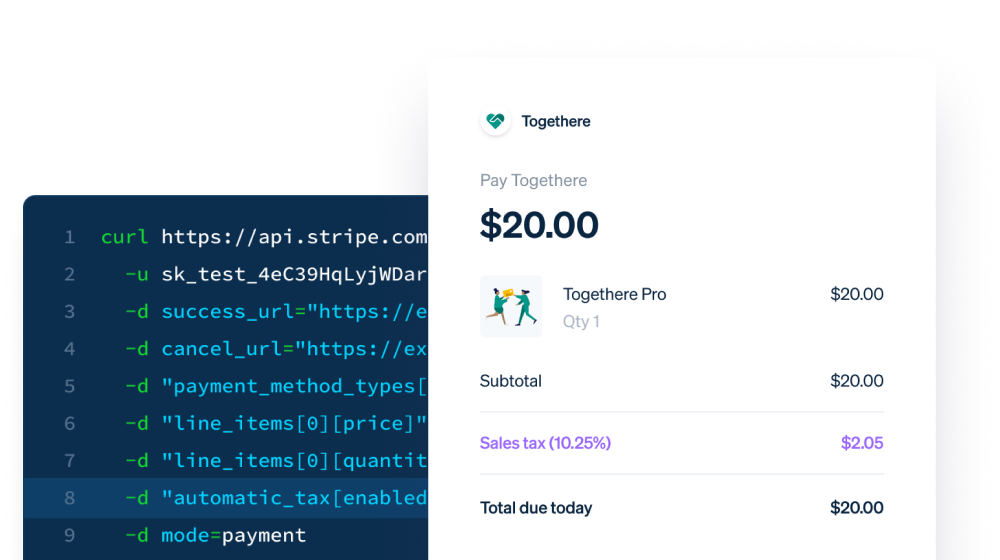
For most scenarios, Stripe works very well. However, the requirements to register every product in the Stripe dashboard impose challenges in certain situations. Stripe is not currently explicitly HIPAA compliant, and therefore, should not be used for situations where protected health information might be shared with your payment processor (such as paying for a medical test).
TaxJar
TaxJar is a cloud-based platform that automates sales tax compliance. TaxJar was acquired by Stripe in 2021. Unlike Stripe, TaxJar does not require you to explicitly save any personal data. This makes it a good choice for situations where an extra layer of data protection or HIPAA compliance is necessary.
In order to get the tax rate for one specific transaction we can use the API for developers and make the following request using the auth token we receive after signing up (the following code uses the taxjar-ruby gem).
Fintech Software Development Services
Get the CEO's Take
Handpicked tech insights and trends from our CEO.